
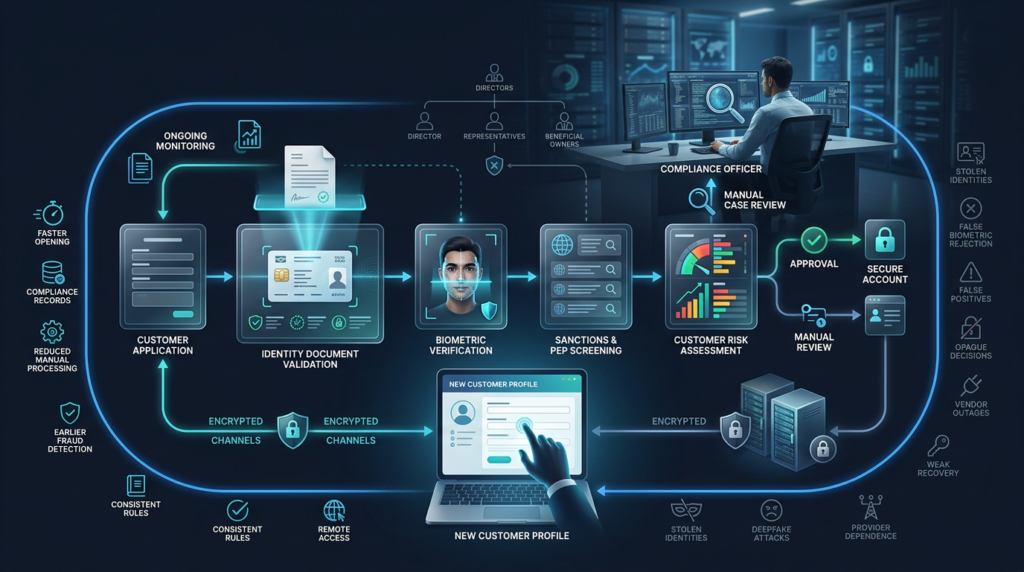
eKYC is the electronic process used by banks and other regulated businesses to identify customers, verify identity evidence, assess financial-crime risk, and create compliance records during remote onboarding. A complete eKYC process may combine document validation, biometric checks, sanctions screening, customer risk assessment, manual review, and ongoing due diligence.
Electronic onboarding can be faster than branch-based verification, but speed alone does not make the process reliable.
A strong process must establish:
- who the customer claims to be;
- whether the identity evidence is authentic;
- whether the applicant is connected to that evidence;
- whether the customer presents elevated financial-crime risk;
- whether the proposed relationship is consistent with the institution’s policies;
- whether customer information remains accurate after onboarding.
The final decision belongs to the regulated business, not merely to the software returning a match score.
What Is eKYC?
eKYC means electronic Know Your Customer.
The term describes the use of digital systems to perform customer identification, identity verification, risk assessment, and related onboarding procedures without requiring every applicant to visit a physical location.
Common eKYC tools include:
- online application forms;
- identity-document scanning;
- digital identity credentials;
- database validation;
- facial comparison;
- liveness or presentation-attack detection;
- sanctions and politically exposed person screening;
- fraud detection;
- customer risk scoring;
- electronic signatures;
- manual case review.
FATF Recommendation 10 requires financial institutions to identify customers, verify their identities using reliable and independent information, identify beneficial owners, understand the intended relationship, and conduct ongoing due diligence. Electronic tools can support these obligations, but the underlying responsibilities remain with the institution.
eKYC Meaning in Simple Terms
Traditional KYC may require the customer to:
- Visit a branch or office.
- Present original documents.
- Complete paper forms.
- Speak with an employee.
- Wait for manual checks.
An electronic process moves some or all of these steps online.
The customer may:
- Complete a digital application.
- Photograph an identity document.
- scan a document chip;
- record a short facial video;
- provide information about occupation or business activity;
- submit beneficial-owner information;
- receive an approval, rejection, or manual-review request.
The word electronic describes the delivery method.
It does not mean that the process is automatically approved, fully automated, or identical across countries.
What Is KYC Verification?
KYC verification is the process through which a regulated business confirms customer identity and gathers sufficient information to understand and manage the relationship.
The phrase is commonly used in search and marketing, although the wording can be slightly repetitive because identity verification is already one part of KYC.
A complete KYC process may include:
- customer identification;
- identity verification;
- beneficial-owner identification;
- understanding the purpose of the account;
- sanctions screening;
- politically exposed person checks;
- customer risk classification;
- source-of-funds inquiries when required;
- ongoing monitoring;
- updating customer information.
A successful identity-document check does not complete every KYC obligation.
The document may be genuine while the customer still requires additional checks because of ownership structure, geographic exposure, expected transactions, occupation, source of funds, or another risk factor.
KYC vs eKYC vs Identity Verification
| Process | Main purpose | Typical scope |
|---|---|---|
| Identity verification | Confirm that an applicant matches claimed identity evidence | Documents, databases, biometrics, digital credentials |
| KYC | Identify the customer and assess the relationship | Identity, beneficial ownership, purpose, risk and records |
| eKYC | Perform KYC through electronic systems | Digital onboarding, automated checks and manual review |
| AML monitoring | Detect suspicious activity during the relationship | Transactions, behavioral patterns, alerts and investigations |
| Authentication | Confirm that a returning user controls the enrolled account | Passkey, device, password, security key or biometrics |
Identity verification is an important input into eKYC.
Identity verification is not a substitute for understanding the customer, beneficial ownership, expected activity, or ongoing behavior.
How the eKYC Verification Process Works
Step 1: Customer data collection
The applicant provides information required for the account or service.
For an individual, this may include:
- legal name;
- date of birth;
- residential address;
- nationality;
- occupation;
- tax residence;
- contact information;
- account purpose.
For a business, the institution may request:
- legal company name;
- registration number;
- registered address;
- directors;
- authorized representatives;
- ownership structure;
- beneficial owners;
- expected business activity.
The business should collect information needed for a defined purpose rather than gathering every available attribute.
Step 2: Identity evidence collection
The customer provides accepted identity evidence.
Possible evidence includes:
- passport;
- national identity card;
- driving licence;
- residence permit;
- government-issued digital credential;
- trusted electronic identity record.
The system may capture:
- document images;
- barcode information;
- machine-readable zone data;
- chip information;
- digital signatures;
- expiration date;
- issuing authority.
Step 3: Document validation
KYC verification software evaluates whether the document is authentic, accurate, current, and suitable for the required assurance level.
Document checks may examine:
- security features;
- signs of editing or replacement;
- document template;
- data consistency;
- photograph placement;
- expiry;
- barcode or chip data;
- issuer records;
- evidence of copying or screen replay.
NIST separates identity proofing into evidence collection, validation, and verification. Validation establishes that the evidence is authentic, accurate, and valid before the applicant is connected to it.
Step 4: Applicant verification
The system determines whether the applicant is the person connected to the evidence.
Possible methods include:
- facial comparison with the document portrait;
- possession of a trusted digital credential;
- confirmation through an authoritative identity service;
- attended video verification;
- in-person escalation;
- another approved identity-binding method.
An extracted name and document number are not enough.
Stolen identity details may describe a real person without proving that the applicant owns the identity.
Step 5: Biometric and liveness checks
Remote onboarding may compare a live facial capture with the identity-document portrait.
Presentation-attack detection attempts to identify:
- printed photographs;
- screen replays;
- recorded videos;
- masks;
- injected camera feeds;
- face morphs;
- synthetic or deepfake media.
A biometric match is a probabilistic result rather than absolute proof.
The institution should combine biometrics with document validation, device signals, fraud indicators, and manual review where appropriate.
Step 6: Screening
The institution may screen the customer and relevant connected persons against:
- sanctions lists;
- politically exposed person data;
- internal fraud records;
- prohibited or restricted customer categories;
- other legally permitted risk sources.
A possible match does not always mean that the applicant is the listed person.
The system should compare additional attributes and provide a review process for false matches.
Step 7: Customer risk assessment
The business assigns a risk level based on relevant factors.
Possible factors include:
- customer type;
- occupation or industry;
- ownership structure;
- country exposure;
- expected account activity;
- delivery channel;
- product risk;
- source of funds;
- intended transaction volume.
The risk score influences the extent of due diligence, approval authority, limits, and monitoring.
Step 8: Decision and account controls
The result may be:
- approved;
- approved with limits;
- additional information required;
- enhanced due diligence;
- manual review;
- rejected;
- onboarding discontinued.
A regulated business should not allow an unexplained software score to make every final decision.
The institution needs policies defining which cases can be automated and which require human judgment.
Step 9: Record creation
The system stores an auditable record of:
- customer information;
- evidence reviewed;
- verification method;
- screening results;
- risk assessment;
- reviewer actions;
- decision;
- date and time;
- later updates.
FATF standards apply recordkeeping obligations to both physical and digital customer due-diligence information. The design of the electronic system affects how records are retained, accessed, and assigned to responsible providers.
Step 10: Ongoing due diligence
Customer due diligence does not end when the account is opened.
The institution may need to:
- monitor transactions;
- update expired documents;
- review changes in ownership;
- rescreen relevant customers;
- investigate unusual activity;
- revise the risk rating;
- request updated source-of-funds information.
FATF Recommendation 10 requires ongoing scrutiny of the relationship and transactions to determine whether activity remains consistent with the institution’s knowledge of the customer and risk profile.
eKYC Process Flow
Customer application
        ↓
Identity information and evidence
        ↓
Document authenticity checks
        ↓
Applicant and biometric verification
        ↓
Sanctions, PEP and fraud screening
        ↓
Customer risk assessment
        ↓
Automated decision or manual review
        ↓
Account controls and recordkeeping
        ↓
Ongoing due diligence and monitoring
The visible customer journey may take only a few minutes.
The supporting compliance process can involve several systems, data providers, reviewers, policies, and regulated responsibilities.
Individual eKYC vs Business eKYC
| Area | Individual customer | Business customer |
|---|---|---|
| Primary identity | Natural person | Registered legal entity |
| Main evidence | Personal identity documents | Registration and constitutional records |
| Ownership analysis | Usually not applicable | Identify and verify beneficial owners |
| Representatives | Customer acts personally | Verify directors or authorized persons |
| Relationship purpose | Personal use | Business operations and account purpose |
| Risk factors | Occupation, geography, product use | Industry, ownership, geography and activity |
| Complexity | Often lower | Can involve several entities and ownership layers |
Business onboarding requires more than confirming that a company registration exists.
The institution may need to understand:
- who ultimately owns or controls the company;
- who is authorized to act;
- whether ownership information is current;
- why the account is required;
- what activity is expected;
- whether the structure is consistent with the stated business.
FATF standards require institutions to identify beneficial owners and understand the ownership and control structure of legal-person customers.
What Is eKYC Verification Software?
KYC verification software is a set of tools used to collect customer information, perform checks, organize evidence, manage alerts, and create compliance records.
A complete solution may include:
| Software component | Function |
|---|---|
| Application workflow | Collects customer and business information |
| Document capture | Obtains images, chip data or digital credentials |
| OCR and data extraction | Converts document content into structured fields |
| Document validation | Checks authenticity, validity and consistency |
| Biometric engine | Compares the applicant with trusted evidence |
| Liveness detection | Detects presentation or replay attacks |
| Screening engine | Checks sanctions, PEP and other risk data |
| Risk-rating engine | Applies customer risk rules |
| Case management | Routes uncertain cases to reviewers |
| Audit trail | Records evidence, decisions and actions |
| Monitoring integration | Connects onboarding data with later activity |
| Reporting | Supports compliance and management review |
The most useful software does not merely produce a green or red result.
The software should explain:
- which checks were completed;
- which evidence was used;
- why an alert was generated;
- whether the result is final;
- whether the customer can retry;
- whether human review is required.
Automated eKYC vs Manual Review
| Criterion | Automated review | Manual review |
|---|---|---|
| Speed | Seconds or minutes | Minutes, hours or longer |
| Scalability | High | Limited by staffing |
| Consistency | Applies configured rules uniformly | Can vary between reviewers |
| Complex cases | Often weaker | Better for unusual evidence |
| Explainability | Depends on system design | Reviewer can document reasoning |
| Fraud detection | Strong for known patterns | Stronger for contextual judgment |
| Cost per standard case | Usually lower | Usually higher |
| Accessibility exceptions | May reject valid users | Can resolve edge cases |
The strongest model is often hybrid.
Automation handles clear, standard cases. Trained reviewers examine:
- low-quality evidence;
- partial data matches;
- unusual documents;
- possible sanctions matches;
- complex company structures;
- suspected fraud;
- applicants who cannot complete the standard digital process.
European Banking Authority guidance requires financial institutions using remote onboarding solutions to maintain safe and effective processes under AML/CFT and data-protection requirements. The guidance also emphasizes document authenticity and reliable connection between the evidence and the person being onboarded.
What Is Bank Biometric Verification?
Bank biometric verification uses a biological or behavioral characteristic to connect a customer with identity evidence or an existing account.
Examples include:
- facial comparison during account opening;
- fingerprint authentication in a banking application;
- facial authentication before a sensitive transaction;
- voice comparison during customer support;
- biometric checks during account recovery.
The purpose matters.
A facial comparison during onboarding helps connect an applicant to an identity document. A fingerprint used during login helps authenticate a previously enrolled customer.
These are different processes.
A bank should not treat a successful device biometric unlock as fresh proof of legal identity unless the full system securely connects the biometric, device, account, and enrolled customer.
Biometric Verification Risks
False acceptance
The system accepts an impostor as the legitimate customer.
False rejection
The system rejects the real customer.
Presentation attacks
A criminal uses a photograph, video, mask, or another imitation.
Injection attacks
Altered or synthetic media is inserted directly into the digital capture process.
Biometric data exposure
A face or fingerprint cannot be replaced as easily as a password.
Performance differences
Accuracy may vary with capture quality, device, lighting, age, appearance, and population group.
Account-recovery weakness
Strong biometric onboarding can be undermined by an email or telephone recovery process with weaker controls.
NIST’s 2025 identity-proofing guidelines require remote biometric collection under the NIST framework to include presentation-attack controls and include specific requirements for forged media, privacy, retention, and alternative proofing pathways.
Is Remote eKYC Automatically High Risk?
No.
Remote onboarding can create additional threats because the institution cannot physically inspect the applicant and evidence.
However, the delivery channel alone does not determine the final risk.
FATF guidance explains that non-face-to-face onboarding using reliable, independent digital identity systems and appropriate risk controls may present standard risk and, in some circumstances, lower risk.
Relevant controls can include:
- stronger identity evidence;
- digital signatures;
- verified document-chip data;
- presentation-attack detection;
- device and network analysis;
- transaction limits;
- increased monitoring;
- confirmation through another trusted account;
- manual review.
A branch visit can also fail when employees accept forged documents, overlook inconsistencies, or follow weak procedures.
The correct comparison is not “digital versus safe.”
The correct comparison is the assurance and risk controls of each complete process.
eKYC Is Not a One-Time Check
One of the most common misconceptions is that KYC ends after a customer uploads a passport and passes a selfie check.
The institution’s knowledge of the customer can become outdated.
Changes may include:
- expired identity evidence;
- new address;
- changed occupation;
- new beneficial owner;
- changed company activity;
- increased transaction volume;
- new geographic exposure;
- changed sanctions or PEP status.
Ongoing due diligence helps the institution determine whether the relationship still matches the original customer profile.
This creates an important distinction:
Onboarding establishes the initial customer profile.
Ongoing due diligence tests whether that profile remains accurate.
eKYC and Digital Identity
Digital identity verification confirms that a person matches the identity evidence presented during onboarding.
eKYC uses that result as one part of a wider compliance process.
A reusable government or private digital credential may reduce repeated document uploads when the institution can evaluate:
- the credential issuer;
- assurance level;
- digital signature;
- status and revocation;
- attributes provided;
- proof that the applicant controls the credential.
FATF guidance focuses on how digital identity systems can support customer identification and verification at onboarding and may also contribute to ongoing due diligence and transaction monitoring.
eKYC and Open Banking
Open banking services rely on bank authentication and consent, but regulated providers may still need eKYC when establishing a new customer relationship.
Open banking data may support:
- account ownership confirmation;
- income assessment;
- transaction-history analysis;
- fraud detection;
- source-of-funds inquiries.
Access to banking data does not automatically establish legal identity or complete all customer-due-diligence requirements.
The provider must determine which information is reliable, current, authorized, and relevant to the required checks.
Benefits of eKYC
Remote onboarding
Customers can apply without travelling to a branch.
Faster standard-case processing
Automated checks can process clear cases quickly.
Structured records
Digital workflows create consistent fields, timestamps, and evidence references.
Lower manual workload
Reviewers can focus on exceptions rather than re-entering standard data.
Earlier fraud detection
Systems can evaluate document, biometric, device, behavioral, and duplicate-identity signals together.
Wider service access
Remote verification may improve availability for customers who live far from physical branches.
Consistent policy application
Configured rules can apply the same baseline checks to comparable customers.
Technology can improve customer due diligence by increasing efficiency, data quality, auditability, and access, but FATF notes that institutions must still manage privacy, data quality, model, cyber, and third-party risks.
Main eKYC Risks
Identity fraud
Criminals may use stolen or synthetic identities.
Deepfake fraud
Synthetic media can imitate the document holder during remote capture.
False matches
A screening system may confuse the customer with another person.
False rejection
A legitimate applicant may fail because of poor document quality, appearance changes, device limitations, or algorithmic errors.
Data privacy
eKYC may involve documents, addresses, biometrics, ownership data, and financial-risk information.
Vendor dependency
The institution may depend on external document, biometric, database, screening, and cloud providers.
Data-quality risk
An authoritative-looking database can still contain outdated or incorrect information.
Model risk
Risk scores and automated decisions may reflect poor assumptions, incomplete testing, or inappropriate thresholds.
Operational outages
A provider failure can prevent every new customer from completing onboarding.
Customer exclusion
A digital-only pathway may disadvantage customers without supported documents, modern devices, reliable connectivity, or suitable biometrics.
Weak manual review
Automation cannot compensate for reviewers who lack training or do not receive meaningful evidence.
Unclear responsibility
The regulated institution remains accountable even when external software performs important checks.
Why More Checks Do Not Always Create Better eKYC
Adding additional providers and databases can appear to strengthen verification.
Each new connection can also introduce:
- inconsistent data;
- duplicate alerts;
- greater privacy exposure;
- additional vendor risk;
- higher false-positive rates;
- more complex investigations;
- longer customer journeys.
A strong process connects each check to a specific risk.
For example:
| Risk | Appropriate control |
|---|---|
| Forged document | Authenticity and issuer validation |
| Stolen real document | Applicant-to-document verification |
| Photo or video replay | Presentation-attack detection |
| Sanctioned customer | Sanctions screening and review |
| Shell company misuse | Beneficial-owner analysis |
| Unexpected transactions | Ongoing monitoring |
| Account takeover | Strong authentication and recovery controls |
Practical Note: The best eKYC process is not the one with the largest number of checks. The strongest process uses reliable evidence, applies controls to identified risks, explains uncertain results, escalates complex cases, and continues monitoring after the account is opened.
How to Evaluate KYC Verification Software
1. Define the regulatory scope
Identify which countries, products, customer types, and legal obligations apply.
2. Review supported documents
Check:
- country coverage;
- document types;
- chip reading;
- digital credentials;
- language support;
- authenticity methods.
3. Examine verification methods
Determine whether the provider performs:
- extraction only;
- template checking;
- security-feature analysis;
- issuer validation;
- biometric comparison;
- presentation-attack detection.
4. Test sanctions and PEP screening
Review:
- data sources;
- update frequency;
- matching logic;
- transliteration;
- aliases;
- date-of-birth matching;
- reason codes.
5. Evaluate manual review
Confirm:
- reviewer qualifications;
- escalation criteria;
- quality control;
- decision documentation;
- response time.
6. Review risk scoring
The business should understand which factors influence the score and when staff can override it.
7. Check privacy and retention
Determine:
- what data is stored;
- where it is processed;
- which subcontractors receive it;
- how long it is retained;
- how deletion works.
8. Inspect API reliability
Test:
- expired sessions;
- duplicate requests;
- webhook failures;
- timeouts;
- uncertain status;
- provider outage.
9. Review accessibility
Provide alternatives for customers unable to complete the automated process.
10. Plan vendor exit
The institution should retain access to compliance records and be able to migrate without losing evidence or audit history.
eKYC Software Evaluation Checklist
| Question | Stronger signal | Warning signal |
|---|---|---|
| What does “verified” mean? | Defined completed checks | Unexplained confidence score |
| Is the document validated? | Security and issuer checks | OCR extraction only |
| How is the applicant connected? | Multi-signal verification | Selfie without strong evidence |
| Are deepfakes addressed? | Tested PAD and injection controls | Basic motion prompt |
| Can alerts be explained? | Clear matched fields and reasons | Black-box result |
| Is manual review available? | Documented escalation process | Automated rejection is final |
| Is business KYC supported? | Ownership and representative workflows | Personal documents only |
| Does it support ongoing review? | Updates and monitoring integration | Onboarding-only product |
| How is data retained? | Defined schedule and deletion process | Indefinite storage |
| Can the provider be replaced? | Exportable records and migration plan | Proprietary inaccessible evidence |
Common eKYC Mistakes
Treating a selfie as complete KYC
Facial comparison does not establish beneficial ownership, relationship purpose, or customer risk.
Accepting extracted document data as validation
OCR can read a forged document accurately.
Treating every screening alert as a true match
Sanctions and PEP alerts require comparison and review.
Rejecting every uncertain customer
A manual or alternative verification route may resolve valid cases.
Using identical checks for every customer
A risk-based approach changes the extent of checks according to the relationship and identified risk.
Ignoring existing customers
Customer information and risk can change after onboarding.
Outsourcing accountability
A software provider can perform checks, but the regulated institution remains responsible for its policies and decisions.
Collecting unnecessary personal data
Additional information increases breach and privacy exposure.
Ignoring account recovery
A criminal may bypass strong onboarding by exploiting a weaker recovery process.
Frequently Asked Questions
What is eKYC?
eKYC is electronic Know Your Customer. It uses digital systems to identify customers, verify identity evidence, assess risk, create compliance records, and support remote onboarding.
What does eKYC mean?
eKYC means that KYC procedures are performed electronically rather than entirely through paper forms and physical meetings.
What is eKYC verification?
eKYC verification is the electronic process of validating customer information and evidence, connecting the applicant to the claimed identity, and completing relevant onboarding checks.
What is KYC verification?
KYC verification is the process through which a regulated business identifies a customer, verifies the customer’s identity, and gathers information needed to assess the relationship.
Is eKYC the same as identity verification?
No. Identity verification is one part of eKYC. eKYC may also include beneficial ownership, sanctions screening, PEP checks, customer risk assessment, recordkeeping, and ongoing review.
How does eKYC work?
The customer submits information and identity evidence. Software validates the evidence, verifies the applicant, performs risk screening, assigns the case for automated or manual review, and creates an audit record.
What documents are needed for eKYC?
Requirements vary by provider and jurisdiction. Common evidence includes a passport, national identity card, driving licence, residence permit, or trusted digital credential.
What is biometric verification in eKYC?
Biometric verification compares a characteristic such as the applicant’s face with a trusted reference, usually an identity-document portrait or enrolled credential.
Is biometric verification mandatory?
Not universally. Requirements depend on jurisdiction, product, risk, accepted evidence, and the provider’s onboarding method.
Can eKYC be fully automated?
Clear standard cases may be automated, but uncertain evidence, possible screening matches, complex ownership, and suspected fraud often require manual review.
Is remote eKYC safe?
Remote eKYC can provide reliable verification when it uses appropriate evidence, document validation, fraud controls, security, risk assessment, and alternative review pathways.
What is KYC verification software?
KYC verification software collects customer data, validates evidence, performs identity and risk checks, routes alerts, records decisions, and supports compliance reporting.
Does eKYC end after account opening?
No. Customer information should remain current, and institutions may need to monitor transactions, update documents, review risk, and rescreen relevant customers.
Why does eKYC verification fail?
Common causes include unsupported documents, poor image quality, expired evidence, inconsistent information, failed biometrics, possible screening matches, device risk, and suspected fraud.
Final Thoughts
eKYC is not a single document scan, database search, or facial comparison.
A complete process combines:
- customer information;
- reliable identity evidence;
- document validation;
- applicant verification;
- biometric and fraud controls;
- beneficial-owner checks;
- sanctions and PEP screening;
- risk assessment;
- manual review;
- recordkeeping;
- ongoing due diligence.
The electronic interface can make onboarding faster and more accessible.
The institution must still understand what each check proves and what it does not prove.
A genuine identity document does not prove that the applicant owns it. A strong facial match does not establish the purpose of a business relationship. A clean sanctions result does not guarantee that future activity will match the expected profile.
The practical decision rule is:
Use electronic checks to build an evidence chain,
not to replace compliance judgment with one score.
Automation determines how efficiently standard cases move through the process.
Evidence quality, risk assessment, explainability, ongoing monitoring, and human escalation determine whether the resulting customer relationship can be trusted.